





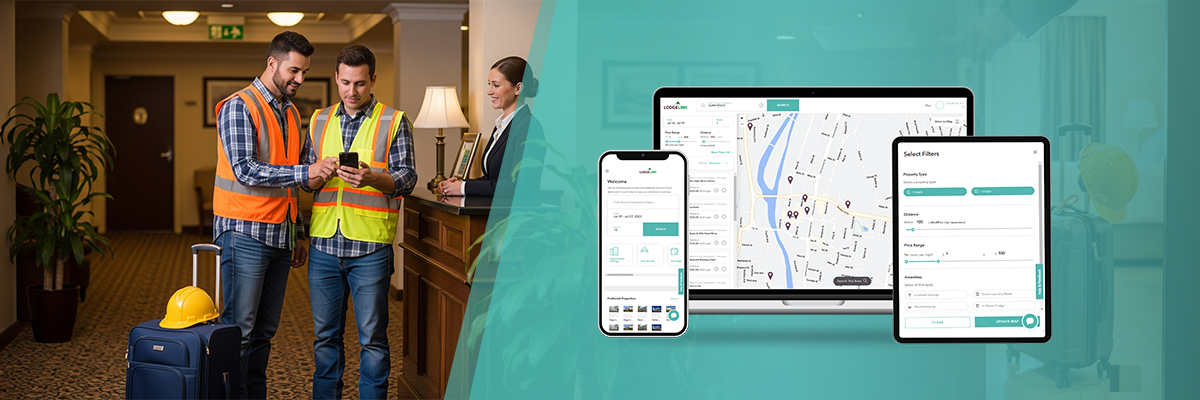
For Canadian construction, energy, utility and infrastructure projects, arranging rooms is only one part of moving workers between job sites. Coordinators also manage shift rotations, transportation, changing schedules and project expenses. Crew travel management software connects these details in a shared workflow, giving teams a clearer view of each assignment.
Table of Contents
- 1. How Crew Travel Management Software Supports Rotations and Schedule Changes
- 2. Connect Transportation With Accommodation
- 3. Select Accommodation Around Worksite Needs
- 4. Improve Cost Tracking and Invoice Review
- 5. Strengthen Communication and Duty-of-Care Planning
- 6. Give Field Supervisors Useful Mobile Access
- 7. Use Reporting to Plan Future Projects
- 8. Assess the Platform Against Real Operating Needs
- Conclusion
1. How Crew Travel Management Software Supports Rotations and Schedule Changes
Project schedules often change between booking and checkout. Workers may rotate midweek, extend their shifts or transfer to another location. When these changes are recorded in separate emails, it becomes harder to confirm which rooms are still required.
Coordinators can use crew travel management software to update guest lists, stay dates and room allocations in one place. For example, a maintenance team working on a northern Alberta site might replace several departing technicians while keeping the remaining rooms. Confirming cancellation terms and releasing unused rooms promptly can help limit unnecessary charges.

2. Connect Transportation With Accommodation
Remote assignments may involve flights, shuttles, rental vehicles and hotel stays. A room reservation alone does not show whether a worker can reach the property after arriving at an airport or whether transportation aligns with a shift change.
Some crew travel management software connects lodging arrangements with air and ground transportation planning. Coordinators can review arrival times, pickup details and check-in requirements for the same trip. This is particularly useful for fly-in projects, where missed connections can affect crew handovers.
3. Select Accommodation Around Worksite Needs
The lowest nightly rate is not always the most practical choice. A hotel farther from a worksite may increase driving time, while limited truck parking or inconvenient meal hours can make an extended stay harder for workers.
A workforce hotel booking platform can help teams assess properties by location, budget and useful amenities, including laundry, parking and access to meals. For projects across several sites, workforce travel management software can also support consistent accommodation choices. Before confirming a stay, coordinators should check property-specific policies, shift-friendly facilities and the actual distance to the job site.
4. Improve Cost Tracking and Invoice Review
Expenses become harder to manage when different crews book rooms under inconsistent references. Finance staff may receive separate hotel invoices, while project managers lack a clear view of upcoming accommodation costs.
For finance teams, crew travel management software can support cost-centre coding, consolidated invoices and reporting by project. This allows staff to compare planned spending with recorded bookings and investigate unexpected extensions. Better visibility does not automatically mean lower costs: accurate records, clear approvals and regular invoice checks remain essential.
5. Strengthen Communication and Duty-of-Care Planning
During severe weather, road closures or urgent site changes, supervisors need current contact and itinerary information. Depending on the platform, travel management may include traveller alerts, itinerary visibility and communication tools. These capabilities can support an employer’s existing duty-of-care procedures, including confirming where teams are expected to stay. They do not replace emergency response plans, direct worker check-ins or workplace safety obligations. Access to personal and location information should also follow applicable privacy requirements and internal permissions.
6. Give Field Supervisors Useful Mobile Access
A site supervisor may need to confirm a booking or request an extension while away from the office. Mobile access can make current details easier to retrieve without searching through email chains or paper records.
Authorized personnel may use workforce travel management software to review stays, adjust reservations and contact travellers from the field. Role-based permissions are important because booking coordinators, operations leaders and finance teams need different levels of access. Permissions can also limit unnecessary access to personal information.
7. Use Reporting to Plan Future Projects
Historical booking information can reveal recurring patterns, such as extensions during peak maintenance periods or limited room availability near certain sites. Accurate project codes and guest records help crew travel management software reveal trends that managers can review.
For a contractor operating across Alberta, Saskatchewan and British Columbia, comparing accommodation requirements by region may highlight where extra planning time is necessary. Reports are most useful when managers examine the reasons behind the figures rather than treating them as forecasts.
8. Assess the Platform Against Real Operating Needs
When reviewing workforce travel booking companies, businesses should look beyond property listings. Check support for rotations, group bookings, transportation, reservation changes, consolidated billing and after-hours assistance.
For example, LodgeLink lists rotation scheduling, bookings of up to 100 rooms per reservation, transportation support, cost reporting, a mobile app and 24/7 customer assistance among its published features. Availability and terms should be checked for the intended location and assignment. Choosing crew travel management software should ultimately reflect the company’s actual workflows, budget responsibilities and travel policies.
Frequently Asked Questions
What does crew travel management software do besides booking hotels?
It can support rotation scheduling, transportation planning, expense reporting and traveller communication. Available tools vary by provider, so businesses should verify the capabilities they need.
Can a platform manage last-minute crew changes?
Many systems allow coordinators to extend stays, change guest details or release rooms. Any modification fees and availability depend on the specific booking terms.
How can businesses monitor accommodation expenses?
Project codes and consolidated reporting can make travel spending easier to review. Finance teams should still reconcile invoices and check approval records.
What matters when comparing Canadian workforce booking services?
Assess remote-area coverage, crew-friendly amenities, support hours and flexible reservation policies. Check whether transportation and billing tools fit existing procedures.
Does a mobile booking tool replace workplace safety processes?
No. Mobile access can help supervisors retrieve itineraries and contact details. Employers still need suitable emergency plans, worker check-ins and privacy safeguards.
Conclusion
Hotel bookings are only the first step in successful workforce travel coordination. Crew travel management software can bring room assignments, transportation plans, financial records, field updates and traveller communication into a clearer operational process. For Canadian employers managing remote sites or changing crew schedules, the practical benefit is better access to information when decisions need to be made. A suitable platform should complement existing safety procedures, approval rules and project planning rather than replace them.
Exploring workforce travel options in Canada? Find LodgeLink’s location on Google Maps and get directions before contacting the team.